00;00;00;11 - 00;00;20;07
Speaker 1
You sit down on the couch after a long day, you pick up that remote and turn on the TV while you watch. A lot of smart TVs are quietly taking note of what's on the screen and sending that information off somewhere else. The same thing happens to almost all the streaming sticks your fire TV, your Roku, even Apple TV to varying degrees.
00;00;20;07 - 00;00;41;20
Speaker 1
It's a not a hidden camera, and it's not a spy thriller. It's something even more subtle than that, and almost no one knows how it's actually turned on by default, because no one ever told them. This is what we're going to talk about today.
00;00;41;22 - 00;01;02;00
Speaker 1
Welcome to your Tech Makeover, the podcast that gives you tips and tricks to help you simplify and get more out of the technology in your life. I'm your host, Frank Bravo. Today's topic is smart TV privacy. What is your TV actually collecting about you and where does that information go? And where do streaming devices like fire strikes or Roku sticks or TV?
00;01;02;00 - 00;01;22;04
Speaker 1
Apple TVs fit in. Even your smart TVs are on this too. And a small handful of settings that actually make a really big difference. You don't need to throw your new TV out. What you need to do is become aware of where the switch is live, and not be paranoid about it. So let's get into it. Your TV is like a computer now.
00;01;22;04 - 00;01;47;26
Speaker 1
It's a really useful way to actually think about this. The TV in your living room is no longer just a piece of glass that shows pictures. It's a computer with a screen attached, running an operating system connected to the internet with apps installed on it. It might be a Samsung or an Lee of Vizio, Sony, TLC or TCL TLC if you really like your TV, Roku TV, Amazon Fire TV they all work the same way.
00;01;47;26 - 00;02;09;18
Speaker 1
I left Apple TV out of that too, though they're there as well. It's a dumb TV we grew up with. They're not around anymore. Only the current TVs are online. They all have their own software, and they have companies behind them that are very interested in what we watch and when we watch it. When you bought your TV, the salesperson talked about the price, maybe the size, and definitely the picture.
00;02;09;18 - 00;02;40;07
Speaker 1
But nobody mentioned to you that it's also bringing home data to those companies as a collection device. The main thing your TV is doing in the background is something called automatic content recognition. The industry shortens that to ACR. You may have never actually seen that phrase on the TV menu, and that's on purpose. Different brands use friendlier sounding names like Viewer Information Services, Live plus smart interactivity or simply viewing data on Roku TVs.
00;02;40;08 - 00;03;01;18
Speaker 1
Look for use info from TV inputs. They all describe various ideas of the same thing. ACR works a little bit like Shazam, the mobile app that you hear a few words of a song, and if it's playing nearby, it might be able to identify the title and the artists matching to a huge sound catalog. But this is for what's on your screen.
00;03;01;19 - 00;03;40;10
Speaker 1
The TV sample, small pieces of the image, and the audio turns them into a digital fingerprint and compares that fingerprint with a huge library of ads, shows and movies. Here's the part that surprises people ACR doesn't care how the video got on the screen, but it can identify what you're watching even when the picture is coming from cable, a Blu ray player, a game console, or maybe even a streaming stick plugged into that TV, the TV is reading the screen itself, so your TV may know that you're watching a particular game on Saturday, that you saw a certain car commercial last night, or that you're rewatching the same show three evenings in a row.
00;03;40;11 - 00;04;01;25
Speaker 1
That information gets bundled up and delivered based on your TV model, your internet address, and sometimes your rough idea of a location and gets sent off to whoever manufactured that TV and whoever they partnered with. This is why sometimes it feels like little pop ups on the TV pop up and say, you can also watch this show here, at least on my TV.
00;04;01;27 - 00;04;25;13
Speaker 1
That's what it does. But what happens to all this data? Once the viewing data leaves your TV, a few common things will happen with it. The most common use is targeted advertising. The data gets matched up with your household, often over your internet address, and then ads on your phone, your laptop, and even connected to other TVs. Can a be aimed at people who are watching them while you watch?
00;04;25;18 - 00;04;47;17
Speaker 1
That's why you saw a commercial and Saturday night it sometimes feels like it's falling around for the next week. The second uses measurements, network streaming services and advertisers play good money to know who's watching what, but they also buy aggregated viewing data and build reports on that. Your individual habits are part of a much bigger picture that they are selling.
00;04;47;19 - 00;05;17;19
Speaker 1
And third, the data can be sold or shared with third parties for future use. The privacy policies, if you were to actually read them, often allow for fairly broad sharing, and this isn't a wild theory. In 2017, the Federal Trade Commission and the state of New Jersey settled a case with Vizio, who, after collecting data histories from millions of smart TVs without customers being informed and sharing that information with third parties, Vizio agreed to pay millions of dollars as part of that settlement.
00;05;17;20 - 00;05;38;17
Speaker 1
The case made a public practice, but it is not the public practice that is rare now. Most every brand does some version of that today. The difference is most of them are clear and they tell you that they're going to do it and they make it quote unquote, easy to opt out. A quick shout out to listeners like you who help make your Tic make over possible.
00;05;38;19 - 00;05;58;01
Speaker 1
Your support helps keep this podcast going, and I truly appreciate it. Want to contribute? Just click the link in the show notes or visit your makeover. Plus, as a thank you, supporters who give $25 or more will get $25 off a one time consultation with me to help you simplify your tech. Thanks for being part of the Your Tech Makeover community.
00;05;58;02 - 00;06;21;02
Speaker 1
Now back to what I was saying. Plenty of people don't use the smart features built into their TV, but instead they plug in a streaming stick or something like an Apple TV box and live outside of it instead. So let's talk about those because they have their own privacy stories. Fire TV, which is an Amazon product, lives inside the Amazon advertising world.
00;06;21;02 - 00;06;46;16
Speaker 1
It tracks what apps you open, what you watch within Amazon's own apps, and what you search for. And it all ties back to your Amazon account. If you're also shopping on amateur Amazon or using an echo speaker, all that activity can be combined and build a fairly good profile on you. There is also settings to limit how that data is used for ads, and to reset that advertising ID, which we'll get into in just a minute.
00;06;46;19 - 00;07;18;06
Speaker 1
Roku, which makes both standalone sticks and the operating system on TVs, including the ones I own, is another way that they even get more aggressive about ads. Roku makes it a lot of money from their advertising and devices. Collect information about what channels you use, what you're watching, and which adds you see, Roku also has its own equivalent of ACR and the TVs that run Roku, also known as Roku TV, the stick, or the TV are basically all using that same operating system.
00;07;18;09 - 00;07;46;27
Speaker 1
Apple TV, the little black box from Apple, not the subscription, but the actual box is generally more privacy friendly than the others. Apple makes a lot of money from selling hardware and subscriptions, not necessarily from selling ads against your viewing data, and that shows up in the defaults. Apple TV still collects information about recommendations and the power of the App Store and the app TV subscription service, but it gives you a clear controls over things like personalized ads and the Siri voice data.
00;07;46;28 - 00;08;07;12
Speaker 1
It's not perfect, but if privacy is a top priority for you and you can afford it, maybe that's the best choice for the box. A useful rule of thumb, though, is if a streaming device is very cheap, the company is usually making money on ads, data, or both. If the streaming device costs lots more, the company usually makes more money on the hardware.
00;08;07;13 - 00;08;29;16
Speaker 1
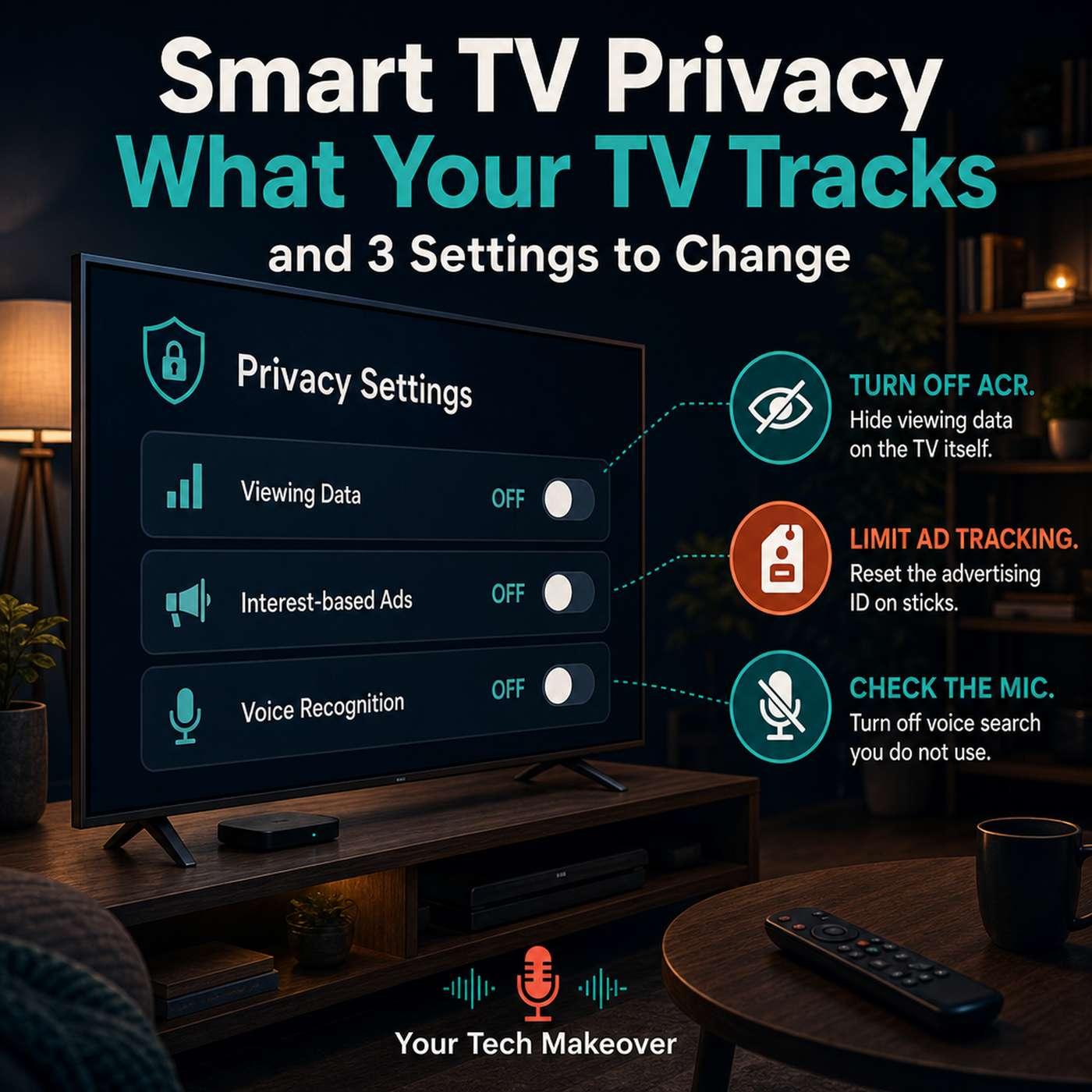
Neither approach is really evil, but it's just good to know what game that they're playing. So how do you address this? You're not going to opt out of the modern internet by changing TV settings, but in about ten minutes you can shut off the loudest data faucets and there are three places to look. First, ACR, it's on the TV in settings that's usually under privacy terms or general.
00;08;29;17 - 00;08;57;17
Speaker 1
Just find it and turn it off. Anything about viewing data, viewing information services, smart interactivity, live Plus or content recognition? Search the web for your brand plus the model and turn off ACR in the menu. If it's buried, you'll be able to find it. Second, the advertising ID on your stick or your box. Think of it as a reset label ad systems that recognizes your household, turning it and off and changing it.
00;08;57;19 - 00;09;24;07
Speaker 1
It doesn't remove the ads, most of them make it less personally tailored. You can look for under privacy, maybe ad limit tracking, turn off device usage where you see that comfortable, or you can even reset the ID once per device when you feel like you need to. Third is your voice and microphone. If you don't use your TV search remote for voice, turn that off because it is probably always listening.
00;09;24;07 - 00;09;42;22
Speaker 1
You could also maybe turn it off from an always listening feature if you don't use it. I mean, if you do use it, that's great. And you know, it's really useful, but you just need to know that it's there. In my case, I don't mind giving up a little bit of information for the features that they power, but it's not how everyone feels now.
00;09;42;22 - 00;10;04;16
Speaker 1
You know how it works and why it's there. Your TV is doing a lot more than showing you the shows. It's logging the shows, the ads, the time, the household. Not because the device is evil. Well, some may argue that the company is behind them are, but the different episodes are what they really want to know. It's because this is a business model behind cheap, sharp, beautiful screens.
00;10;04;16 - 00;10;23;24
Speaker 1
The good news is, is the controls are really in there. If you just look, they're just not in the shipping box and they're not the thing the salesperson is going to tell you about. If you go check your own privacy settings this week, I would love to know what you find. Was the data sharing already turned off? Was it on by default, or could you not even find it on your particular brand?
00;10;23;25 - 00;10;44;28
Speaker 1
That's the kind of feedback that really helps shape follow up episodes, because no two TVs bury the stuff in the exact same place, so let me know. And as always, if you have ideas for topics you'd like me to cover, please feel free to contact me via email at Frank at your Tech Makeover. That's it for now. Thanks for listening to your tech makeover, if you haven't already.
00;10;44;29 - 00;11;03;26
Speaker 1
Don't forget to subscribe to this podcast so that you don't miss an episode. And if it's your first time here. Thanks for listening. If you're on Substack, make sure you subscribe to the newsletter so you are alerted of new content as I post it. And you can also check out your Tech Makeover, where you can find out more information about each of these episodes.
00;11;03;26 - 00;11;13;11
Speaker 1
And if you want to find out more about me, please visit Bravo. Com. Until next time, I'm Frank Bravo, and this has been your tech makeover.